> For the complete documentation index, see [llms.txt](https://docs.ins-pi.com/llms.txt). Markdown versions of documentation pages are available by appending `.md` to page URLs; this page is available as [Markdown](https://docs.ins-pi.com/blueprints/get-the-app/release-notes.md).
# Release Notes
What changed in each release, and what you need to do about it.
Each release lists what is new, what changed in behaviour you may already rely on, and anything an administrator has to set up before the new features work.
{% hint style="info" %}
Your installed version is shown in **Settings**, at the bottom of the panel. Features marked **New in 26.1** do not appear on earlier versions.
{% endhint %}
## 26.1
Scheduled audits. Blueprints could already tell you whether one blueprint matched its template. This release runs that check across your CMDB on a schedule, routes each problem to whoever owns the record, and shows whether data quality is improving over time.
### Reviews
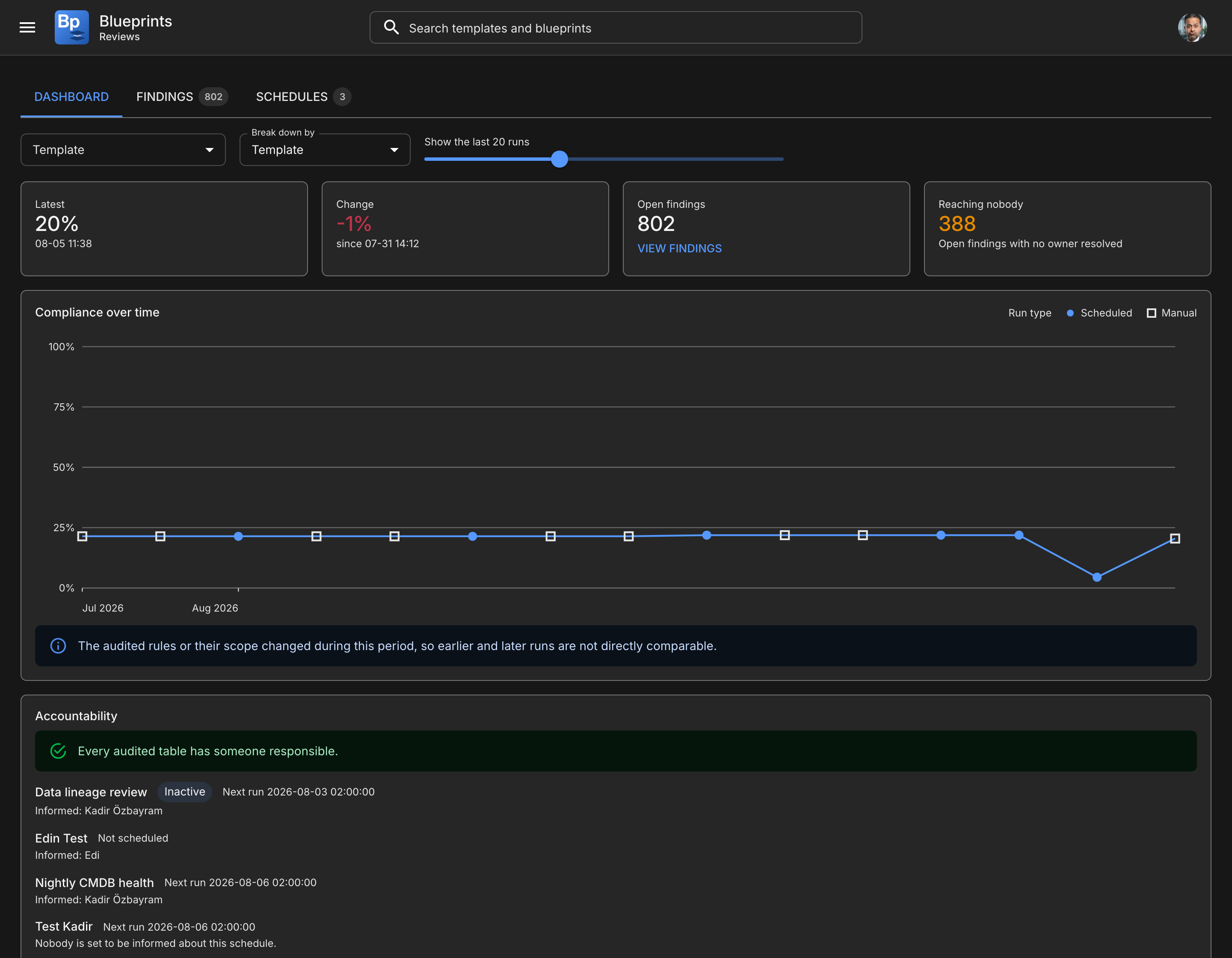
A new workspace with three tabs, reached from **Reviews** on Home.
| Tab | Answers |
| ------------- | ----------------------------------------------------------- |
| **Dashboard** | Is data quality improving, and where are the worst problems |
| **Findings** | What do I personally have to fix |
| **Schedules** | When do audits run, and who hears about them |
See [Reviews](/blueprints/review-and-share/reviews.md).
Reviews, new in 26.1
### Scheduled audits
Audits run without anybody pressing a button. A schedule names the template to audit, how often, and at what time.
Cadences: daily, weekly, every two weeks, monthly, quarterly, half-yearly and yearly. The month-based cadences advance by calendar month, so an audit set for the 31st keeps its date rather than drifting earlier each month.
A schedule audits **one template**. A schedule is a cadence over one map; two maps on one cadence produce a run whose findings are hard to attribute, and two schedules say the same thing more clearly.
See [Scheduled Audits](/blueprints/review-and-share/scheduled-audits.md).
### Ownership resolved per record
Each audited table is mapped to a **field on the record** that names its owner, such as `managed_by` or `support_group`. A finding then reaches the owner of that particular record.
This is deliberately not a single nominated person per table. On a CMDB of any size, one person receiving every finding on a table is a queue that is mostly other people's problems, and nobody works it.
Where a record names nobody, an optional **fallback** takes the finding rather than it reaching no one. That fallback can be a group or a named person; a group is usually right, for the same reason the mapping is a field, but a table with one genuine owner does not need a group invented for it.
See [Scheduled Audits](/blueprints/review-and-share/scheduled-audits.md#who-fixes-what).
### Remediation records
A finding can raise a record in a table you already use — a change, a demand, or your own data quality queue. Blueprints does not ship its own task table, so remediation work sits in the same queue, with the same assignment rules and SLAs, as everything else.
The record closes automatically when a later audit finds the data fixed, including when it was fixed somewhere other than the ticket. If somebody closes the record by hand while the data still fails, the next run raises a fresh one.
See [Scheduled Audits](/blueprints/review-and-share/scheduled-audits.md#remediation-records).
### Notifications
One message per recipient per run, never one per finding. A run finding 334 problems across two owners sends two emails.
Three notifications, each independently switchable:
* **Responsible** — to whoever owns the flagged records, with counts and a link
* **Run summary** — to the people informed about a schedule
* **Summary report** — a periodic management view on its own cadence, independent of how often audits run
See [Scheduled Audits](/blueprints/review-and-share/scheduled-audits.md#notifications).
### Rules that apply to some records only
A relationship rule can now say which records it applies to, per direction, under **Applies to** in the Template Editor. "Obsolete applications must have no capability mappings" audits only obsolete applications; an active one is not subject to the rule, so it neither passes nor fails and does not move the score. This is different from the counting conditions beneath it, which decide which **related** records satisfy the rule. See [Templates](/blueprints/work-in-the-app/templates.md#limiting-which-records-a-rule-applies-to).
Requires the `rule_scope_query` column on the audit rules table. Without it the scope is discarded on save. See [ServiceNow Administration](/blueprints/admin-and-governance/servicenow-admin-guide.md#setting-up-scheduled-audits-261).
### Relationship conditions are enforced everywhere
A set of fixes with one theme: the canvas, the compliance score, the data panel and the Auditor now count the same way, and the same way regardless of which direction a relationship was stored or which record was added first.
* Conditions on related records are applied on the canvas and in the score, not only in the Auditor. A rule asking for one **production** instance no longer passes on a development one.
* A relationship to a record that is not on the canvas no longer satisfies a rule. Its field values were never loaded, so nothing could show it meets a condition.
* One authored rule is one entry and one check, whichever way the template stored the pair. Previously the same rule could appear under both INCOMING and OUTGOING and count twice.
* A failing conditioned rule says why: **"2 connected, 0 match the conditions"** with the conditions listed, instead of "Missing 1 relationship" beside a visibly connected record. Records that are connected but do not match show a neutral filter marker rather than their own green tick.
### Compliance trend
The Dashboard plots compliance over time, per template, per rule or per table. Rates are weighted by how many records each rule evaluated, never averaged across rules — a rule covering 40 records does not carry the same weight as one covering 200,000.
Every point is hoverable. The tooltip gives the date, the rate, how much was evaluated, whether the run was scheduled or forced, and the rules that failed most records **in that run** — so "where were the problems" can be asked of any run, not only the latest.
Series are named in a legend inside the chart, each with its movement across the window. The axis ticks whichever calendar unit the runs span: quarters, then months, then days, and the clock when every run falls on one day.
Trends are built from immutable snapshots, so history survives deleting an audit run.
### Reading the Dashboard
Template, **Break down by** and the run-count slider sit on one row, wrapping to a second line on a narrow screen rather than squeezing the slider to a width where a range of 2 to 50 cannot be aimed.
While the history loads, the chart card shows a spinner. It used to fall through to "No completed audits yet" and then replace that with a chart, which reads as an answer rather than as a wait.
On **Schedules**, the inactive switch sits beside **New schedule** and states the count either way — "3 inactive hidden" or "3 inactive shown" — so a filter cannot silently remove rows.
### Working a backlog
Findings can be filtered to **several templates at once**, because customers split a wide map into narrow ones and then want one backlog rather than two lists that cannot be compared.
Because that makes the list longer, it can be grouped by template, table or responsible. Groups are collapsible with their own counts, and the column you group by leaves the table — the heading already says it.
Sorting and searching both work on the owner's name, which is what most people reach for first when a backlog is theirs to triage.
Clicking a finding opens the record in a **new tab**. Triage is list-shaped, and navigating away costs the filters and the scroll position.
### Changed behaviour
{% hint style="warning" %}
These change how the app behaves for people who already use it.
{% endhint %}
**Elements are now called Records.** The things you put on a canvas, and the counts and headings that describe them, all changed wording: "3 missing elements" is now "3 missing records", the compliance panel's **Elements** tab is now **Records**, and so on throughout the app and this documentation. Command has always called them Records, and one concept with two names across two products in the same suite is a cost you paid on every page.
Nothing moved and nothing behaves differently. Stored data, field names and the API are untouched, so saved blueprints, templates and integrations are unaffected. The change is wording only.
{% hint style="warning" %}
**Reviews is not yet translated in every language.** The workspace ships in English, German, Turkish, Spanish, Portuguese and French. In Japanese, Hindi and Bengali its labels and messages still read in English; the rest of the application is translated as before. Nothing is broken by this — the text is simply not localised yet.
{% endhint %}
**Findings are visible only to their audience.** Template Editors see the whole estate. Everyone else sees findings assigned to them or to one of their groups, findings on schedules they are informed about, and trends for templates they have a stake in. See [Roles and Permissions](/blueprints/start-here/roles-and-permissions.md#who-sees-which-audit-results).
**Configuring audits requires the Blueprint Template Editor role.** Creating or editing a schedule, and forcing a run, are template-editor actions. Blueprint Editors can see the schedules they are informed about, but the create, edit and run controls are not shown to them.
**The Reviews button on Home now opens the Dashboard** rather than the Findings list, and carries a count of the findings assigned to you.
### For administrators
26.1 adds tables, columns and platform records that do not arrive with the application update. Audits do not run until they exist, and nothing else in the app is affected while they are missing.
See [ServiceNow Administration](/blueprints/admin-and-governance/servicenow-admin-guide.md#setting-up-scheduled-audits-261) for the full list and the order to create it in.
{% hint style="danger" %}
**On a domain-separated (MSP) instance, create the Set Domain business rules first.** The six new audit tables carry a `sys_domain` column but shipped without a rule to populate it, so their rows would be written with an empty domain and be visible across domains. Run `./scripts/create-domain-business-rules.sh` before enabling audits. See [Domain separation (MSP)](/blueprints/admin-and-governance/servicenow-admin-guide.md#domain-separation-msp).
{% endhint %}
{% hint style="warning" %}
**Check the three notifications are set to send on an event.** Creating a Notification through the API fills in the event name but leaves **Send when** at its default, **Record inserted or updated**, and a notification in that state never fires. Audits then run and route correctly while producing no email at all, and no failure anywhere to explain it. Run `./scripts/repair-audit-notifications.sh --dry-run` to see the current setting, and without the flag to correct it. See [Three traps worth knowing](/blueprints/admin-and-governance/servicenow-admin-guide.md#three-traps-worth-knowing).
{% endhint %}
## 26.0.0
Templates, blueprints, the canvas, compliance scoring, Auditor, Presenter Mode and commit workflows. See the rest of this documentation for how those work.
### Fixed since release
{% hint style="info" %}
These correct 26.0.0 behaviour and arrive with the **26.1** update. There is no separate 26.0 patch to install.
{% endhint %}
**An empty blueprint reported full compliance.** A blueprint with no records and no relationships read Good, 100%, green. No check had run, which is not the same as every check passing, and on the blueprint list it hid work that had not started. It now reads as not evaluated, and shows a dash rather than a figure. A genuine 0% is unchanged — every check ran and every check failed is a real result.
**A class filter was not applied to records arriving through a relationship.** A record dragged from the Data Hub was filtered, but records pulled in automatically by following a relationship were checked against nothing. So a record the template excluded could land on the canvas, satisfy a rule, and show a tick — while the audit, which does apply the filter, was measuring a different population. Cascade-loaded records are now checked against the same filter, and the app says how many were held back.
**Records already on a canvas were not re-checked when a filter changed.** Adding or tightening a filter left previously-placed records looking legitimate although the audit had stopped counting them. They are now marked with a filter icon — deliberately neither a tick nor a warning, because an excluded record needs removing or the filter widening, not a new relationship.
**Relationship conditions were invisible outside the template editor.** A relationship requiring `type = cots` and `level = 3` showed only its name on the canvas, so a reader had no way to know the rule was conditional at all. Hovering a relationship now lists its conditions under the cardinality rule they qualify, in the blueprint view as well as the editor. The label itself stays the relationship name: printed on the label, two lines of conditions made the label the largest thing on the canvas and pushed the relationship name into second place.
**The Auditor showed half a relationship's conditions.** Each direction reported only the condition set governing its own check, so a relationship conditioned at both ends showed one side, and which side depended on which direction you happened to be reading. Both are now listed, one table per line, under their own heading.
**Conditions showed column names instead of labels.** A condition read `x_inpgh_upmx_health = 1` — a column name from a scoped application, shown to whoever has to fix the record. Field metadata is now loaded for every table on the canvas rather than only the selected relationship's two ends, so the same condition reads `Health = 1` everywhere it appears.
**Auditor did not say why a check failed.** "No matching dependencies found" covered both a genuinely absent relationship and one whose records failed a field condition, so it could not tell you whether to create a relationship or fix a field. It now reports which, and shows the conditions a check applied — including on checks that passed, since that is what confirms the check meant what you intended.
**The condition builder was hard to read.** Conditions, the groups holding them, and the buttons acting on them all rendered at one visual level, so nothing showed where a group began or what a delete button belonged to. Groups are now contained, AND sits between conditions inside a group, and each condition is two lines instead of four. **Add condition** and **OR** sit together inside the group, because they are the same decision - add another test, joined one way or the other.
**Relationship conditions sat under the wrong direction's rule.** Both directions' cardinality controls rendered first and both condition sections after them, so the first section appeared beneath the second rule. Each section now sits directly under the rule it qualifies. They are also renamed: "Conditions on Business Application records" described a class filter, and was read as one, so a condition meant to narrow what counts towards a rule was expected to keep records off the canvas. The heading now says which records count, and says where the class filter actually lives.
**Removing a record left orphans, or took far too much.** Removal offered three choices. "Selected only" left behind every record the removed one had brought in, so deleting `salesforce.com` left its capabilities sitting next to `ServiceNow` as though they belonged to it. "All connected" did the opposite: it followed every link outwards, so a capability shared by two applications carried the removal into the second application and emptied that side of the canvas too.
There is one right answer, so there is now one action. Removal takes the selection plus every record that nothing else still brings in, and stops at anything something else does. Records you added yourself are never taken, and neither are future-state records. When more than the selection would go, a preview names what goes and what stays before anything happens. See [Remove records](/blueprints/work-in-the-app/records-and-relationships.md#remove-records).
**A confirmation message showed its own key instead of a sentence.** The message after removing a record and its dependents had singular and plural forms but was given neither count to choose between, so it rendered the literal text `status.dataHubRemoveItemsWithDependencies`. A check now fails the build if any message with plural forms is used without a count.
**A relationship condition could render without its field name.** The condition builder loads field metadata for both ends of the relationship at once, and the first end to answer cancelled the second, which was then never retried. Whichever end lost the race listed no fields, so a saved condition showed as an operator and a value with nothing naming what it tested: `= Replatform` rather than `Migration Strategy = Replatform`. Both ends now load independently, and a cancelled load is retried instead of being remembered as done.
**A blueprint could not read its own relationship rules.** The relationship panel is read-only in a blueprint, which is correct — the rules belong to the template. It was made read-only by wrapping the panel in a disabled fieldset, and that disables every control inside it, including the chevron that expands a rule to show its cardinality and conditions. So the one place a blueprint reader goes to ask what a relationship requires could not be opened.
It failed silently, too: a disabled fieldset does not mark its descendants disabled, so the chevron looked and reported itself as working while the browser refused every click. A blueprint now shows the rule details outright rather than offering a control that cannot work, and **Add condition** no longer appears where nothing can be added.
**Users holding an older role name resolved to no role.** The role list did not recognise `blueprint_publisher`, the previous name for `blueprint_commit`, so anyone still assigned it was treated as having no application role at all — read-only, with no explanation. It is now accepted as an alias.
**The mouse wheel did nothing over a chart or an icon.** The app cancels wheel events that have nothing to scroll, because the window is a fixed height and a page that rubber-bands under a fixed header looks broken. The check deciding "is there anything to scroll here" only recognised HTML elements, and an SVG element is not one — so it answered no and cancelled the scroll. That covered the compliance chart and every icon in the product, since the icons are SVG. Scrolling now works wherever the pointer is.
**Relationship conditions are marked before you hover.** A relationship carrying conditions shows a **C: *****n*** badge on the canvas, beside the relationship in the panel, and in a template's contents on Home. The conditions themselves are in the tooltip, so without a mark there was no reason to look — which is the problem the conditions were surfaced to solve.
**Condition field lists are alphabetical.** They arrived in dictionary order, which is neither alphabetical nor meaningful: "OPEX Total, Health, Attestation Score, Invoice number" is a list you have to read end to end. Fields the template already selected still come first.
**Run now did not update "last run".** Only the hourly tick stamped it, so forcing a run left the Schedules card showing the previous night's time and read as though nothing had happened.
### Improved since release
**Selecting a record highlights the records it connects to.** Selecting an application used to highlight the relationship lines but nothing at either end, so on a canvas holding two applications and forty capabilities there was no way to see which belonged to which without opening each one.
---
# Agent Instructions
This documentation is published with GitBook. GitBook is the documentation platform designed so that both humans and AI agents can read, navigate, and reason over technical content effectively. Learn more at gitbook.com.
## Querying This Documentation
If you need additional information that is not directly available in this page, you can query the documentation by asking a question.
Perform an HTTP GET request on the following URL with the `ask` and `goal` query parameters:
```
GET https://docs.ins-pi.com/blueprints/get-the-app/release-notes.md?ask=&goal=
```
`ask` is the immediate question: it should be specific, self-contained, and written in natural language.
`goal` is what the user is ultimately trying to achieve, the reason they need the answer. Sharing it helps GitBook give you a better, more relevant answer. A goal is most helpful when it describes the outcome the user wants rather than restating the question. For example, with `ask=how do I create an API token`, a goal like `automate deployments from our CI pipeline` lets GitBook tailor the answer to that use case.
The response will contain a direct answer to the question and relevant excerpts and sources from the documentation.
Use this mechanism when the answer is not explicitly present in the current page, you need clarification or additional context, or you want to retrieve related documentation sections.