> For the complete documentation index, see [llms.txt](https://docs.ins-pi.com/llms.txt). Markdown versions of documentation pages are available by appending `.md` to page URLs; this page is available as [Markdown](https://docs.ins-pi.com/blueprints/review-and-share/compliance.md).
# Compliance and Auditor
Two ways to review a blueprint against its template.
Compliance is the live score you see in the header as you work in the app. Auditor is a separate workspace for reviewing records one by one against a template.
{% hint style="info" %}
Compliance and Auditor work on blueprints, which are ServiceNow records under the `x_inpi_ydbp` scope. What you can see and do depends on your role. See [Roles and Permissions](/blueprints/start-here/roles-and-permissions.md) for details.
{% endhint %}
{% hint style="success" %}
**New in 26.1.** Both check a blueprint you have open. To run the same checks across your CMDB on a schedule and route each problem to whoever owns the record, see [Reviews](/blueprints/review-and-share/reviews.md).
{% endhint %}
## What compliance checks are based on
Compliance always checks against the blueprint's template. Three things get checked:
* **Tables** — whether each table has the right number of records, between any minimum or maximum the template defines
* **Relationships** — whether connections between tables follow the template's rules, including how many are required or allowed, and where the template requires it, whether the related records carry particular field values
* **Fields** — whether the fields the template marks as required are filled in
## Where you see compliance
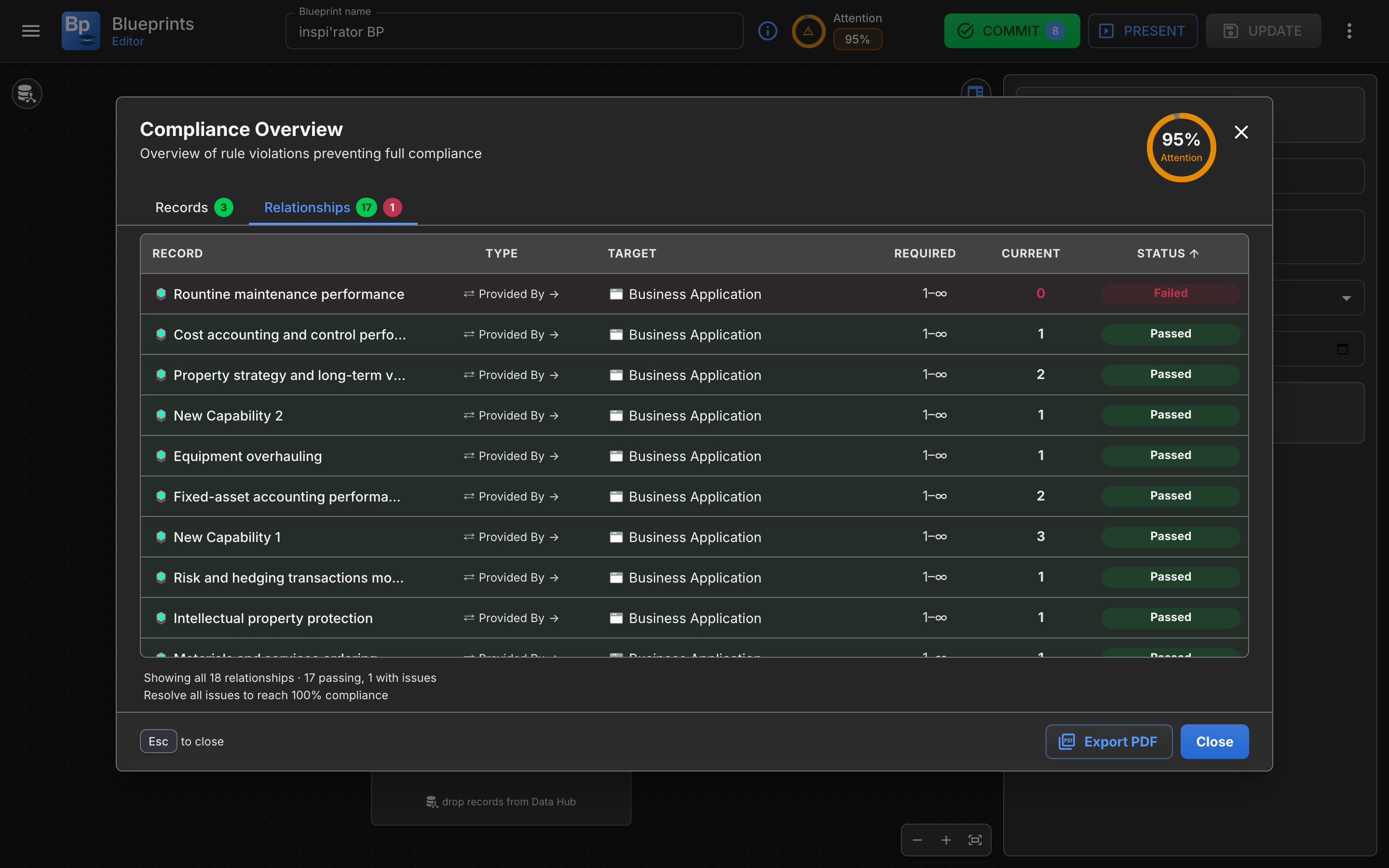
Every rule, what it required, what it found, and whether that passed
## On Home
Each blueprint shows a compliance score in the header so you can spot which blueprints are in good shape and which need attention.
The app uses three high-level states:
| State | Meaning |
| ------------- | ----------------------------------------------------------------------------- |
| **Good** | The blueprint is currently satisfying its checked rules. |
| **Attention** | The blueprint has issues that should be reviewed soon. |
| **Critical** | The blueprint has important missing content or broken rules that need action. |
## In the Blueprint Editor
Compliance appears in four places in the editor:
* **In the header** — a compliance score for the whole blueprint
* **On each table card** — a status indicator for that table
* **On a selected record** — issue counts for fields and relationships
* **In the Compliance Details dialog** — full breakdown on demand
## Compliance Details
Open the **Compliance Details** dialog from the compliance score in the header, or from **Compliance Overview** in the blueprint's menu on Home.
The dialog shows the full compliance picture for the blueprint and answers questions like:
* Which tables are missing required content?
* Which relationship rules are currently broken?
* Is the blueprint close to complete, or missing something fundamental?
Click **Export PDF** to save the result as a PDF.
## Auditor
Use Auditor when you want to review records one by one instead of scanning the canvas. It works best for going through a list of records, marking off each as you go.
Auditor is available to **Blueprint Template Editors**, **Blueprint Editors**, and **Blueprint Committers**.
## Open Auditor
On Home, click **Auditor**, then choose a template from the **Select a Template for Auditor** dialog. The workspace opens on the chosen template.
## Auditor layout
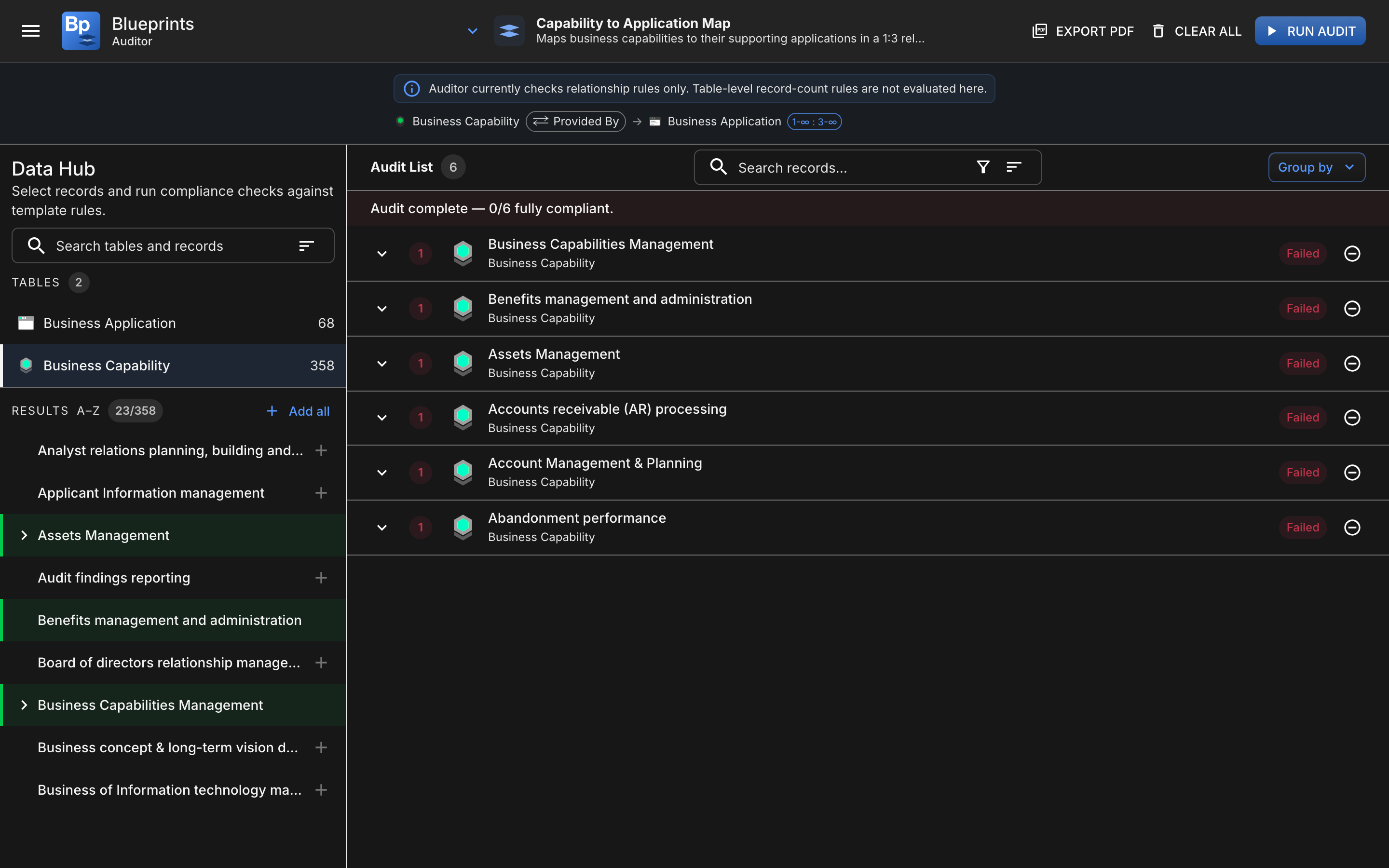
Pick records, run the check, and get a verdict per record
Auditor has three main parts.
### Template Rules header
Shows the template being audited. Expand it to see the rules being checked, collapse it for more space.
### Left: Data Hub
Pick a table, find records, and add them to the Audit List. Use **Add all** to queue the entire table at once, or click individual records to add them one at a time.
### Right: Audit List
Where the audit runs. Search, filter, sort, or group the list. Click **Run Audit** to start, or **Clear All** to empty the list. Click **Export PDF** to save the result when finished.
## Audit statuses
As the audit runs, each item can move through statuses such as:
| Status | Meaning |
| ---------- | ---------------------------------------------------- |
| `queued` | The item is waiting to be checked. |
| `checking` | The audit is currently evaluating the item. |
| `passed` | The evaluated relationship checks passed. |
| `failed` | One or more evaluated relationship checks failed. |
| `error` | The audit could not complete normally for that item. |
Expanding an item shows which checks passed, which failed, and which matching dependencies were found.
## Important scope note
Auditor currently checks **relationship rules only**.
It does **not** currently evaluate table-level minimum and maximum record counts inside the Auditor workflow.
If you need the full blueprint picture, use Auditor together with the normal compliance views in Home and the Blueprint Editor.
## When to use each tool
| Use this tool | Best when | Scope |
| ---------------------- | ----------------------------------------------------------------------------------------------------------------------------------------- | ----------------------------------- |
| **Compliance Details** | You are already inside a blueprint, want a blueprint-wide summary, or need to export a blueprint compliance report. | Whole blueprint |
| **Auditor** | You want to review selected records one by one, build a dedicated audit list, or sort, group, and export audit results around a template. | Selected records against a template |
---
# Agent Instructions
This documentation is published with GitBook. GitBook is the documentation platform designed so that both humans and AI agents can read, navigate, and reason over technical content effectively. Learn more at gitbook.com.
## Querying This Documentation
If you need additional information that is not directly available in this page, you can query the documentation by asking a question.
Perform an HTTP GET request on the following URL with the `ask` and `goal` query parameters:
```
GET https://docs.ins-pi.com/blueprints/review-and-share/compliance.md?ask=&goal=
```
`ask` is the immediate question: it should be specific, self-contained, and written in natural language.
`goal` is what the user is ultimately trying to achieve, the reason they need the answer. Sharing it helps GitBook give you a better, more relevant answer. A goal is most helpful when it describes the outcome the user wants rather than restating the question. For example, with `ask=how do I create an API token`, a goal like `automate deployments from our CI pipeline` lets GitBook tailor the answer to that use case.
The response will contain a direct answer to the question and relevant excerpts and sources from the documentation.
Use this mechanism when the answer is not explicitly present in the current page, you need clarification or additional context, or you want to retrieve related documentation sections.