> For the complete documentation index, see [llms.txt](https://docs.ins-pi.com/llms.txt). Markdown versions of documentation pages are available by appending `.md` to page URLs; this page is available as [Markdown](https://docs.ins-pi.com/blueprints/review-and-share/scheduled-audits.md).
# Scheduled Audits
Set an audit to run on its own, route each finding to whoever owns the record, and raise the work.
{% hint style="success" %}
**New in 26.1.** Scheduled audits do not exist on earlier versions.
{% endhint %}
A schedule answers four questions: which template to audit, how often, who fixes what, and who hears about it.
{% hint style="info" %}
Creating and editing schedules requires the **Blueprint Template Editor** role. See [Roles and Permissions](/blueprints/start-here/roles-and-permissions.md).
{% endhint %}
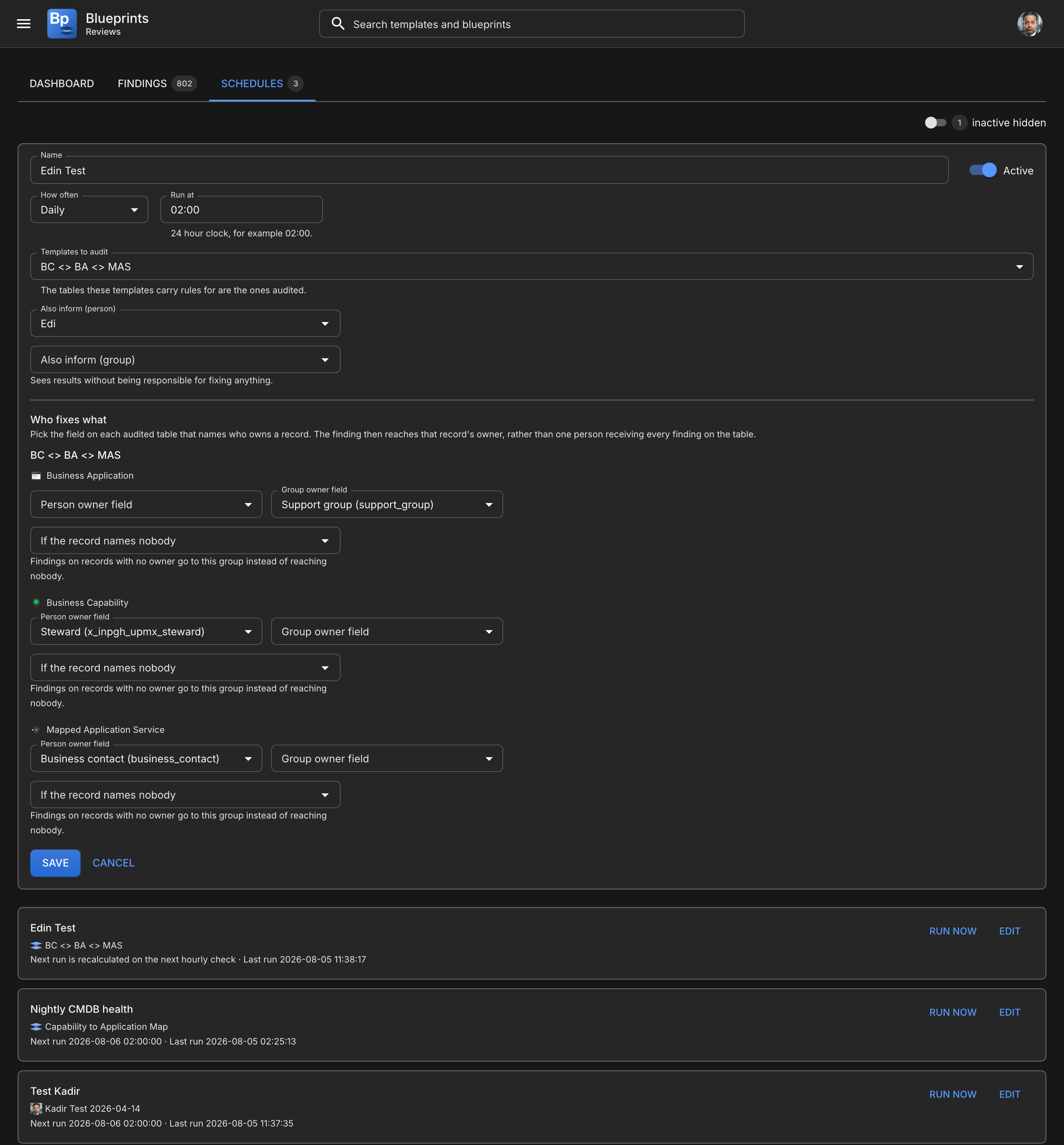
Open **Reviews** on Home, then the **Schedules** tab, then **New schedule**.
One form: what gets audited, how often, who hears about it, and who fixes what
## What gets audited
A schedule names **one template to audit**. The tables that template carries rules for are the ones audited — a template with no rules audits nothing.
One template per schedule, because a schedule is a cadence over one map. Two maps on one cadence produce a run whose findings are hard to attribute, and two schedules say the same thing more clearly. To audit two templates nightly, create two schedules.
{% hint style="warning" %}
If **Who fixes what** is empty after saving, the selected templates carry no audit rules. Open the template, define its relationships or required fields, and save it to project rules.
{% endhint %}
Two schedules can audit the same template, and the page warns you when they do. It is allowed, because two cadences over one map is a reasonable thing to want, but the same broken record then opens a separate finding under each schedule and its owner sees the problem twice.
## How often
| Cadence | Advances by |
| --------------- | ------------------ |
| Daily | 1 day |
| Weekly | 7 days |
| Every two weeks | 14 days |
| Monthly | 1 calendar month |
| Quarterly | 3 calendar months |
| Half-yearly | 6 calendar months |
| Yearly | 12 calendar months |
**Run at** is a 24-hour time, for example `02:00`. Weekly and fortnightly schedules also take a **run day**.
The month-based cadences advance by calendar month rather than by a fixed number of days, so an audit set for the 31st keeps its date instead of drifting earlier each month. Where the next month is shorter, it lands on the last day of that month.
Two behaviours worth knowing:
* A new schedule does not run immediately. It is scheduled for its next occurrence, so creating a nightly audit at midday starts it tonight rather than while you are still filling in the form.
* A schedule that was due several times while the instance was down produces **one** run, not one per missed occurrence.
## Who fixes what
Each audited table is mapped to a **field on the record** that names its owner. The finding then reaches that record's owner.
{% hint style="info" %}
This is deliberately not one nominated person per table. On a CMDB of any size that produces a queue which is mostly other people's problems, and nobody works it.
{% endhint %}
You can set two fields per table, and either alone is enough:
| Field | Points at | Example |
| ---------------------- | ---------------- | --------------------------------------- |
| **Person owner field** | `sys_user` | `managed_by`, `owned_by`, `assigned_to` |
| **Group owner field** | `sys_user_group` | `support_group`, `managed_by_group` |
Both are offered because a record commonly has an individual and a queue, and they are different audiences.
The picker lists only fields that exist on the table and reference the right thing, including fields inherited from a parent table. Most useful owner fields live on `cmdb_ci` rather than on the leaf table, and the picker says which table defines each one.
### Ownership belongs to the template
Mappings are held per **(template, table)** pair, not per schedule. The same table audited under two templates can resolve to different owners, because who owns an application in a capability map is not necessarily who owns it in a data lineage map.
Two consequences:
* Two schedules auditing one template share its mapping. Define it once.
* A run started by hand resolves owners the same way a scheduled run does.
### If the record names nobody
Set a **fallback**: a group or a named person. Findings on records with no owner go there instead of reaching nobody.
Prefer a group. The reason the owner mapping is a field in the first place is that one person receiving every finding on a table is a queue of other people's problems, and a catch-all pointed at an individual rebuilds exactly that. A person is the right choice when the table has one genuine owner — a small estate, or a class only one team touches.
Without a fallback, those findings are recorded as unassigned and shown on the Dashboard under **Reaching nobody**. They are never hidden.
{% hint style="warning" %}
Check the field you pick is actually populated. A field that exists but is empty on every record routes every finding to nobody, which looks like an audit fault and is a data gap.
{% endhint %}
## Notifications
Three notifications, each switchable per schedule.
| Setting | Sends to | Contains |
| ---------------------- | ---------------------------------------- | ----------------------------------------------------------- |
| **Notify responsible** | Whoever owns the flagged records | Failing count, across how many tables and rules, and a link |
| **Notify run summary** | The schedule's informed person and group | Passed, failed, errors, rules, and a link |
| **Notify when clean** | As above | Sends the run summary even when nothing failed |
**Also inform** takes a person and a group, and both receive it. They are different audiences: a named individual who watches the estate, and a distribution list that covers absence.
A group with its own email address is written to at that address, because a distribution list you already maintain is what naming the group meant. A group without one is expanded to its members when the run finishes, so somebody who joined the group today is included today. Either way a recipient needs an email address on their user record: one without is skipped, and the finding still shows on the Dashboard.
{% hint style="info" %}
**Switches on, audits running, no email arriving?** That is an instance setup item rather than a schedule setting. See [Three traps worth knowing](/blueprints/admin-and-governance/servicenow-admin-guide.md#three-traps-worth-knowing).
{% endhint %}
### One message per recipient
Never one per finding. A run finding 334 problems across two owners sends two emails, each carrying its own counts. An owner responsible for three tables hears once, with the totals combined.
Messages link into the findings view rather than listing records. A mail with three hundred rows is unreadable, and the findings list lets the reader filter to their own and click through.
A message covers **that run only**, so an owner is not told tonight's audit found the whole accumulated backlog.
### Notify when clean
Off by default. A clean run mailing everybody every night is how people learn to filter your notifications into a folder they never open.
A **failed** run notifies regardless of this setting. Silence after a failure is indistinguishable from silence after a clean pass, and the two need opposite responses.
## Summary report
A periodic management view, on its own cadence, independent of how often audits run — a weekly report can cover nightly runs.
Configure it on `x_inpi_ydbp_audit_report_schedules`. It takes recipients as a group, a user list, or both, and optionally narrows to particular templates. Leaving templates empty covers everything.
The report carries the compliance rate for the period, the change since the previous period, the current open finding count and a link.
{% hint style="info" %}
A period in which no audits completed produces a report that says so, rather than a report showing 0%. Nothing measured is not the same as everything broken, and the two need opposite reactions.
{% endhint %}
Figures come from snapshots rather than from live findings, so the report and the Dashboard always agree.
## Remediation records
A finding can raise a record in a table you already use.
{% hint style="info" %}
Blueprints does not ship its own task table. Remediation work belongs in the queue your team already works, with your assignment rules, SLAs and reporting, rather than in a queue nobody asked for.
{% endhint %}
Configure a target on `x_inpi_ydbp_remediation_targets`, then point a schedule at it with **Remediation target**.
A target names:
* The **target table**. Any table you already have, whether or not it extends `task`.
* A **field mapping** — where the flagged record, rule, template, run, link, assignee, group and description each go. Mapping is explicit rather than guessed from field names, because `assigned_to` is a person on one customer's table and a queue name on another's.
* **Default values** for fields the target requires but Blueprints has nothing to say about.
* Which **states count as resolved**, and which single state Blueprints writes when it closes a record.
### Validation happens when you save
A configuration that would fail at audit time is refused at save time. The target table must exist, every mapped field must exist on it or a table it extends, every mapped field must be able to hold the value, every default must name a real field, and every mandatory field must be filled by a mapping or a default.
All problems are reported at once, so you fix one form once.
### The lifecycle
| When | What happens |
| --------------------------------------------------- | --------------------------------------------------------------------------- |
| A finding first opens | One record is created and linked to the finding |
| The finding is seen again | Nothing. A nightly audit does not raise a ticket a night |
| The data is fixed, anywhere | The finding closes, and the record closes using the mapped resolution state |
| Somebody closes the record but the data still fails | The finding reopens and a fresh record is raised |
That last row matters: without it, closing a ticket would make the problem look handled while the record stayed broken, and the compliance rate would measure queue hygiene rather than data quality.
A record somebody resolved their own way — closed as skipped rather than complete — is left alone rather than restamped.
### Cross-scope access
The target table is usually outside the Blueprints scope, so the application needs explicit write access to it. Without that, audits still run and findings still appear; only the records are missing, and the audit run says why.
See [ServiceNow Administration](/blueprints/admin-and-governance/servicenow-admin-guide.md#setting-up-scheduled-audits-261).
## When things do not run
| Symptom | Cause |
| ----------------------------- | --------------------------------------------------------------------------------- |
| Nothing ever runs | The hourly job is missing, or its start date is in the future |
| **Who fixes what** is empty | The selected templates carry no audit rules |
| Every finding is unassigned | The owner field is empty on those records, and no fallback person or group is set |
| No remediation records appear | The cross-scope grant is missing. The run's message says `not_permitted` |
| No report arrives | No report schedule exists, or it has no recipients |
---
# Agent Instructions
This documentation is published with GitBook. GitBook is the documentation platform designed so that both humans and AI agents can read, navigate, and reason over technical content effectively. Learn more at gitbook.com.
## Querying This Documentation
If you need additional information that is not directly available in this page, you can query the documentation by asking a question.
Perform an HTTP GET request on the following URL with the `ask` and `goal` query parameters:
```
GET https://docs.ins-pi.com/blueprints/review-and-share/scheduled-audits.md?ask=&goal=
```
`ask` is the immediate question: it should be specific, self-contained, and written in natural language.
`goal` is what the user is ultimately trying to achieve, the reason they need the answer. Sharing it helps GitBook give you a better, more relevant answer. A goal is most helpful when it describes the outcome the user wants rather than restating the question. For example, with `ask=how do I create an API token`, a goal like `automate deployments from our CI pipeline` lets GitBook tailor the answer to that use case.
The response will contain a direct answer to the question and relevant excerpts and sources from the documentation.
Use this mechanism when the answer is not explicitly present in the current page, you need clarification or additional context, or you want to retrieve related documentation sections.