> For the complete documentation index, see [llms.txt](https://docs.ins-pi.com/llms.txt). Markdown versions of documentation pages are available by appending `.md` to page URLs; this page is available as [Markdown](https://docs.ins-pi.com/command/features/future-state-repository.md).
# Future State Repository
Plan records that do not exist yet and explore alternative futures in scenarios, without adding placeholder records to your live data.
The Future State Repository holds the parts of your landscape that do not exist yet. A planned application, a new interface or a future organisational unit can be modelled as a real, named record and placed on roadmaps and maps next to what exists today. Your live data stays a clean record of the present.
## What it is
| Concept | What it means |
| ------------------------------------------------------------------------------- | --------------------------------------------------------------------------------------------------------------------------- |
| **Current state** | The records that exist today in ServiceNow. |
| **Future state** | Planned records that do not exist yet. They are kept apart from the live data and marked as future on their form. |
| [Scenario](/command/the-portal/content-types.md#scenario) | One possible future: which records are added, modified, removed or kept, with target dates and what-if values for measures. |
| [Scenario Comparison](/command/the-portal/content-types.md#scenario-comparison) | Several scenarios side by side, on cost, risk, benefit and rating. |
## When to use it
* You plan a new application or replacement and want to show it on a roadmap before it is built.
* You weigh two or three options for the future landscape and need to compare them.
* You want to plan a retirement without changing the live record.
## How to
### Create a future record
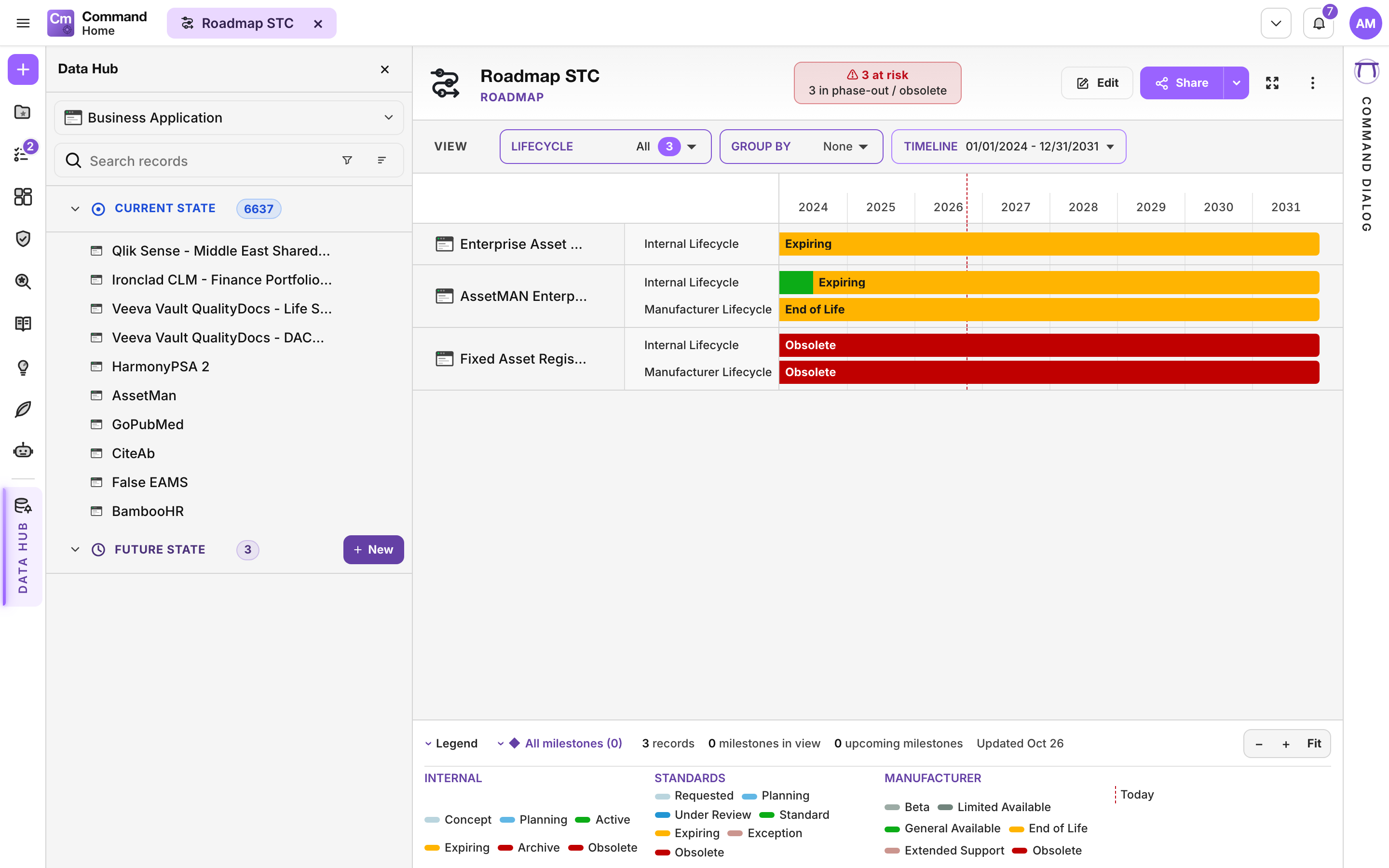
1. Open the [Data Hub](/command/the-portal/data-hub.md#create-a-future-state-record) and choose a table.
2. In the **Future state** section, click **New**. A form opens for the planned record.
3. Fill it in and save it.
4. Drag it onto a roadmap or a map next to current records.
Future state records sit under their own section in the Data Hub
To drop a planned record you no longer need, use **Delete** on its row and confirm **Abandon**. This retires the planned record and removes it from the view.
### Show current, future or both
On a Table or a Roadmap, use the **State** filter: **Current**, **Future** or **Both**.
### Work in a scenario
1. Create a **Scenario** and add records to it.
2. Mark each record as added, modified, removed or kept, and give it a **Target date**, for example a decommission date.
3. Set what-if values for measures on a record. They apply in this scenario only.
4. Read the summary cards: **Cost (TCO)**, **Risk**, **Benefit** and **Rating**.
5. Move the scenario through its status: **Draft**, **Under review**, **Approved**, **Active**, **Archived**.
### Compare scenarios
1. Create a **Scenario Comparison**.
2. Drag scenarios onto it from My Space.
3. Compare **Cost (TCO)**, **Risk**, **Benefit**, **Rating** and the records each one adds, shares or keeps unique. The strongest option is marked **★ Recommended**.
## Good to know
* Planning never overwrites a live record. Removing a record in a scenario retires it only inside that scenario.
* A draft scenario needs to be activated before it is scored in a comparison.
* [Data Governance](/command/features/data-governance.md) can check the quality of planned data in a scenario.
* Measures, Lifecycle and Roadmaps all work with future records, so the plan uses the same views as the present.
{% hint style="info" %}
Turning a planned record into a real one, and committing a scenario to the live data, are not available from the portal yet. Today the Future State Repository is for planning and comparing.
{% endhint %}
## Related
* [Lifecycle](/command/features/lifecycle.md)
* [Measures](/command/features/measures.md)
* [Data Hub](/command/the-portal/data-hub.md)
---
# Agent Instructions
This documentation is published with GitBook. GitBook is the documentation platform designed so that both humans and AI agents can read, navigate, and reason over technical content effectively. Learn more at gitbook.com.
## Querying This Documentation
If you need additional information that is not directly available in this page, you can query the documentation by asking a question.
Perform an HTTP GET request on the following URL with the `ask` and `goal` query parameters:
```
GET https://docs.ins-pi.com/command/features/future-state-repository.md?ask=&goal=
```
`ask` is the immediate question: it should be specific, self-contained, and written in natural language.
`goal` is what the user is ultimately trying to achieve, the reason they need the answer. Sharing it helps GitBook give you a better, more relevant answer. A goal is most helpful when it describes the outcome the user wants rather than restating the question. For example, with `ask=how do I create an API token`, a goal like `automate deployments from our CI pipeline` lets GitBook tailor the answer to that use case.
The response will contain a direct answer to the question and relevant excerpts and sources from the documentation.
Use this mechanism when the answer is not explicitly present in the current page, you need clarification or additional context, or you want to retrieve related documentation sections.