> For the complete documentation index, see [llms.txt](https://docs.ins-pi.com/llms.txt). Markdown versions of documentation pages are available by appending `.md` to page URLs; this page is available as [Markdown](https://docs.ins-pi.com/command/features/lifecycle.md).
# Lifecycle
Track where each record is in its life, from planning to retirement, with dated phases and milestones you can see on forms, roadmaps, tables and dashboards.
Lifecycle tracks how a record moves through its phases over time. It answers a simple question on every record: where is this today, and where is it planned to go next. The same dates drive the record's form, the Roadmap, Table columns and filters, and the Dashboard **Lifecycle summary** widget.
## What it is
A lifecycle is a set of dated phases, optionally grouped into stages, plus milestones. A record sits in one phase at a time and moves on when the next phase starts.
| Concept | What it means |
| ---------------------- | ------------------------------------------------------------------------------------------------------------------------------------------------------------------------------------------------------------ |
| **Phase** | A period in the record's life, such as Evaluate, Operate or Retire. It has a **Start** and, optionally, an **End**. A phase without an end stays open until a later phase follows it. |
| **Stage** | A group of phases, for example Initialization, Productive, Expiration and Non-Productive. |
| **Milestone** | A dated event on a record, such as a vendor end of support or a planned review. It has a **Type**, a **Date** and a **Status**: **Proposed**, **Approved**, **In progress**, **Completed** or **Cancelled**. |
| **Several lifecycles** | One record can carry more than one lifecycle side by side, for example internal and manufacturer, so you can compare them. |
| **Scope** | The same record can follow a different timeline per business unit or region, which matters for matrix organisations. |
See [Lifecycle Stages & Phases](/command/overview/lifecycle-stages-phases.md) for the default stages and phases.
## When to use it
* You need to know which applications are in production, being phased out or already retired.
* You plan a retirement or a replacement and want the dates visible to everyone.
* You want to catch records that run past an approved end date.
* You want to report how a portfolio is spread across its phases.
## How to
### See a record's lifecycle
1. Open the record as a [Form](/command/the-portal/content-types.md#form).
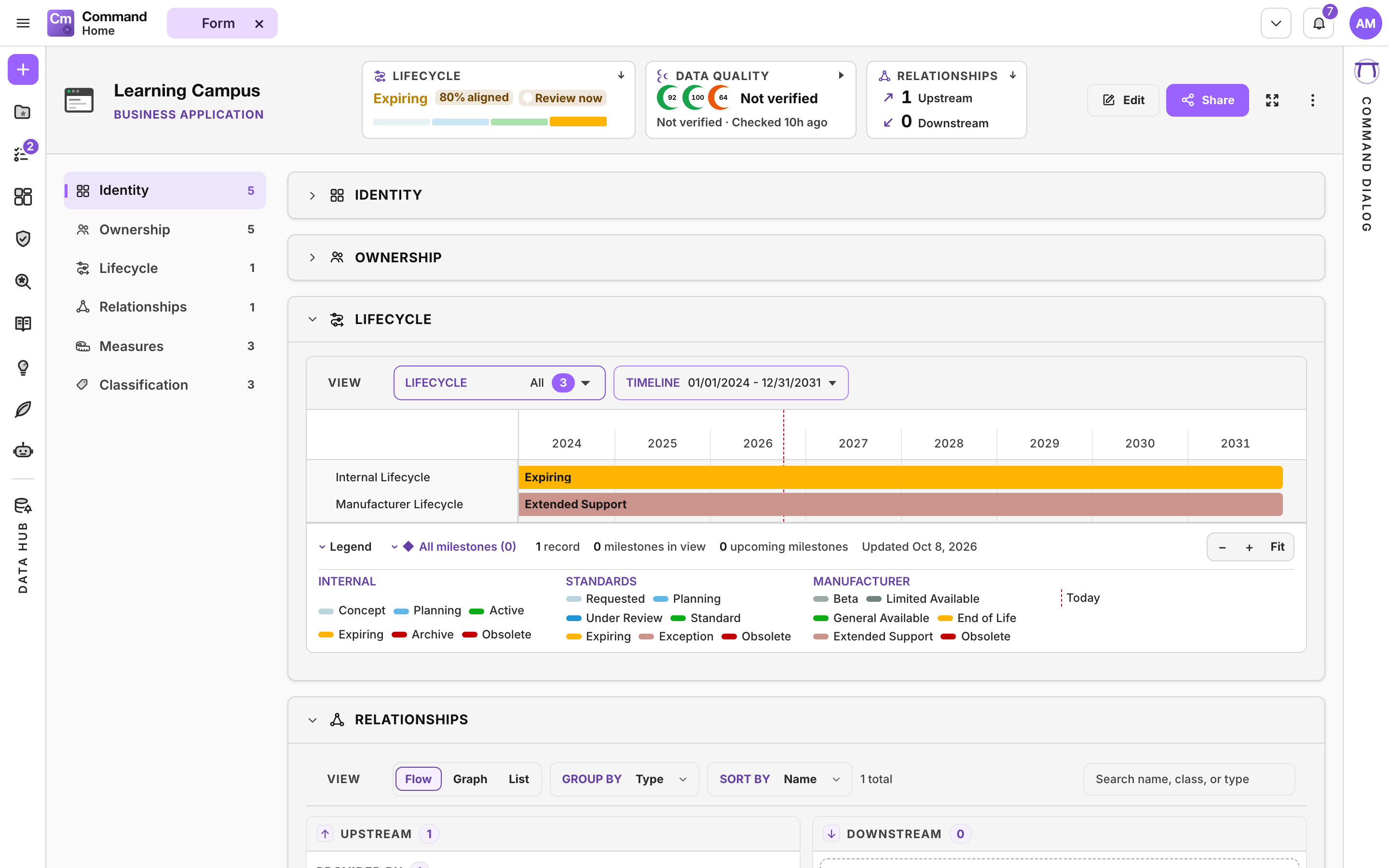
2. Read the **Lifecycle** tile at the top. It shows the current phase and whether it is **Active**, **Planned** or **Inactive**. Hover for the outlook, the risk in the next 12 months and how well the lifecycles align.
3. Click the tile to jump to the **Lifecycle timeline** section of the form.
The Lifecycle tile and the Lifecycle section of a Form
### Add or change phases and milestones on a record
1. On the Form, click **Edit**.
2. In the **Lifecycle timeline** section, open the **⋯** menu and choose **Add phase**, **Add scope** or **Add milestone**.
3. For a phase, pick the **Phase** and set its **Start** and, if known, its **End**. For a milestone, set the **Type**, **Date**, **Status** and the lifecycle it belongs to.
4. Click **Save** on the Form.
### Read a portfolio on a Roadmap
1. Create a [Roadmap](/command/the-portal/content-types.md#roadmap) and drag records onto it from the Data Hub or My Space.
2. In the **View** row, choose which **Lifecycle** to show, the **Scope**, and **Group by** **Table** or **Collection**.
3. Under **Timeline**, set the **Date range**, pick a window preset or change the **Axis** from days to decades.
4. Under **Layout**, switch grid lines, records without lifecycle data, conflicts and colours on or off.
5. Check **Conflicts** at the bottom. A conflict is a record that runs past the end of its approved lifecycle.
6. Switch to **Edit** to change dates directly on the bars.
Lifecycle phases on a Roadmap
### Add lifecycle columns and filters to a Table
1. In a [Table](/command/the-portal/content-types.md#table), open **Columns** and choose the **Lifecycles** category.
2. Add the current phase, or **Stage**, **Phase start**, **Phase end**, **Terminal** or **Next milestone date**.
3. Filter on any of these. To find records a lifecycle does not cover yet, filter on the lifecycle with **is not tracked**.
### Summarise a portfolio on a Dashboard
Add the **Lifecycle summary** widget to a [Dashboard](/command/the-portal/content-types.md#dashboard) to see how many records sit in each current phase.
## Good to know
* Phase names that do not fit a short bar are cut with an ellipsis. Hover to read the full name.
* If your organisation has an approval policy for phase changes, starting a new phase waits for approval in the approver's **My Tasks**. Editing the dates of an existing phase does not. See [Tasks, Notifications and Approvals](/command/the-portal/tasks-and-notifications.md).
* A [Scenario](/command/the-portal/content-types.md#scenario) can retire a record with a target date inside that scenario only, without touching the live lifecycle.
* Administrators define lifecycles, stages, types, scopes and milestone types in **Global Settings > Lifecycle & Milestones**, and approval policies in **Global Settings > Approvals**.
{% hint style="warning" %}
A phase change that is waiting for approval is not shown as pending yet. The change appears once it is approved. If a new phase is missing after you save, check whether an approval is open.
{% endhint %}
{% hint style="info" %}
**Is not tracked** cannot yet be combined with another condition on the same lifecycle.
{% endhint %}
## Related
* [Measures](/command/features/measures.md)
* [Future State Repository](/command/features/future-state-repository.md)
* [Command Dialog](/command/features/command-dialog.md): ask, for example, `create a market lifecycle with phases idea, launch, growth, retire for products`.
---
# Agent Instructions
This documentation is published with GitBook. GitBook is the documentation platform designed so that both humans and AI agents can read, navigate, and reason over technical content effectively. Learn more at gitbook.com.
## Querying This Documentation
If you need additional information that is not directly available in this page, you can query the documentation by asking a question.
Perform an HTTP GET request on the following URL with the `ask` and `goal` query parameters:
```
GET https://docs.ins-pi.com/command/features/lifecycle.md?ask=&goal=
```
`ask` is the immediate question: it should be specific, self-contained, and written in natural language.
`goal` is what the user is ultimately trying to achieve, the reason they need the answer. Sharing it helps GitBook give you a better, more relevant answer. A goal is most helpful when it describes the outcome the user wants rather than restating the question. For example, with `ask=how do I create an API token`, a goal like `automate deployments from our CI pipeline` lets GitBook tailor the answer to that use case.
The response will contain a direct answer to the question and relevant excerpts and sources from the documentation.
Use this mechanism when the answer is not explicitly present in the current page, you need clarification or additional context, or you want to retrieve related documentation sections.