> For the complete documentation index, see [llms.txt](https://docs.ins-pi.com/llms.txt). Markdown versions of documentation pages are available by appending `.md` to page URLs; this page is available as [Markdown](https://docs.ins-pi.com/command/the-portal/my-space.md).
# My Space and Sharing
Reference for My Space, where you save, organise, share, link, delete and restore your Command content.
My Space is where your work lives between sessions: every piece of content you create is saved there, organised into folders, and private until you share it. This page covers finding, organising, sharing, linking, deleting and restoring content. Content in My Space points at records rather than copying them, so reopening an item always shows current data.
## What it is
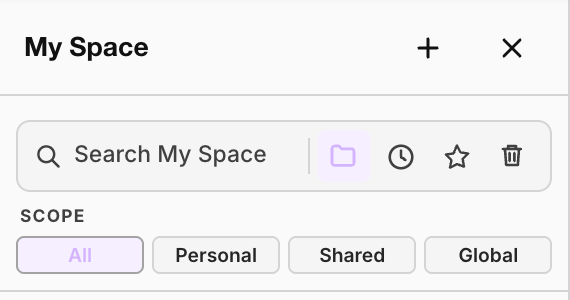
Click **My Space** in the activity rail to open it as a side panel. It holds a tree of folders and items, with these controls above it:
| Control | What it does |
| --------------------------------------------------- | -------------------------------------------------------- |
| Search box | Finds items by name. |
| **Add content** (**+**) | Creates a new folder or a new piece of content. |
| **All items**, **Recent**, **Favorites**, **Trash** | Switch between views of your space. |
| **Scope** | Narrows the tree by where content came from (see below). |
| Scope | Shows |
| ------------ | ------------------------------------------------- |
| **All** | Everything you can reach. |
| **Personal** | Content you own and have not shared. |
| **Shared** | Content shared with you, or that you have shared. |
| **Global** | Content published to everyone. |
Items carry a marker when they are shared, and a star when you have favourited them.
The My Space controls
## When to use it
* To find and reopen anything you or your colleagues have built.
* To group work into folders, for example one per programme.
* To share work with named people or groups.
## How to
### Save content
New content from the create menu is saved to My Space straight away, and changes save automatically. Content the assistant opens for you, such as a table from a chat answer, may not be in My Space yet. Use **⋮ > Save in My Space** in its header to keep it.
### Organise
1. To make a folder, click **Add content** and choose **New folder**. For a folder inside a folder, use the folder's **⋯** menu and **New subfolder**.
2. To open an item, click it. If it is already open, Command switches to its tab.
3. To rename, choose **Rename** from the **⋯** menu, or click the title in the content header.
4. To move, drag the item onto another folder.
5. To copy, choose **Duplicate**. The copy is independent of the original.
6. To favourite, click the star on the row, then use **Favorites** to find it fast.
**Shortcuts** let one item appear in more than one place without being copied. Use **Add shortcut to Personal** on an item's **⋯** menu.
### Share content
You can share content you own, or content you can edit.
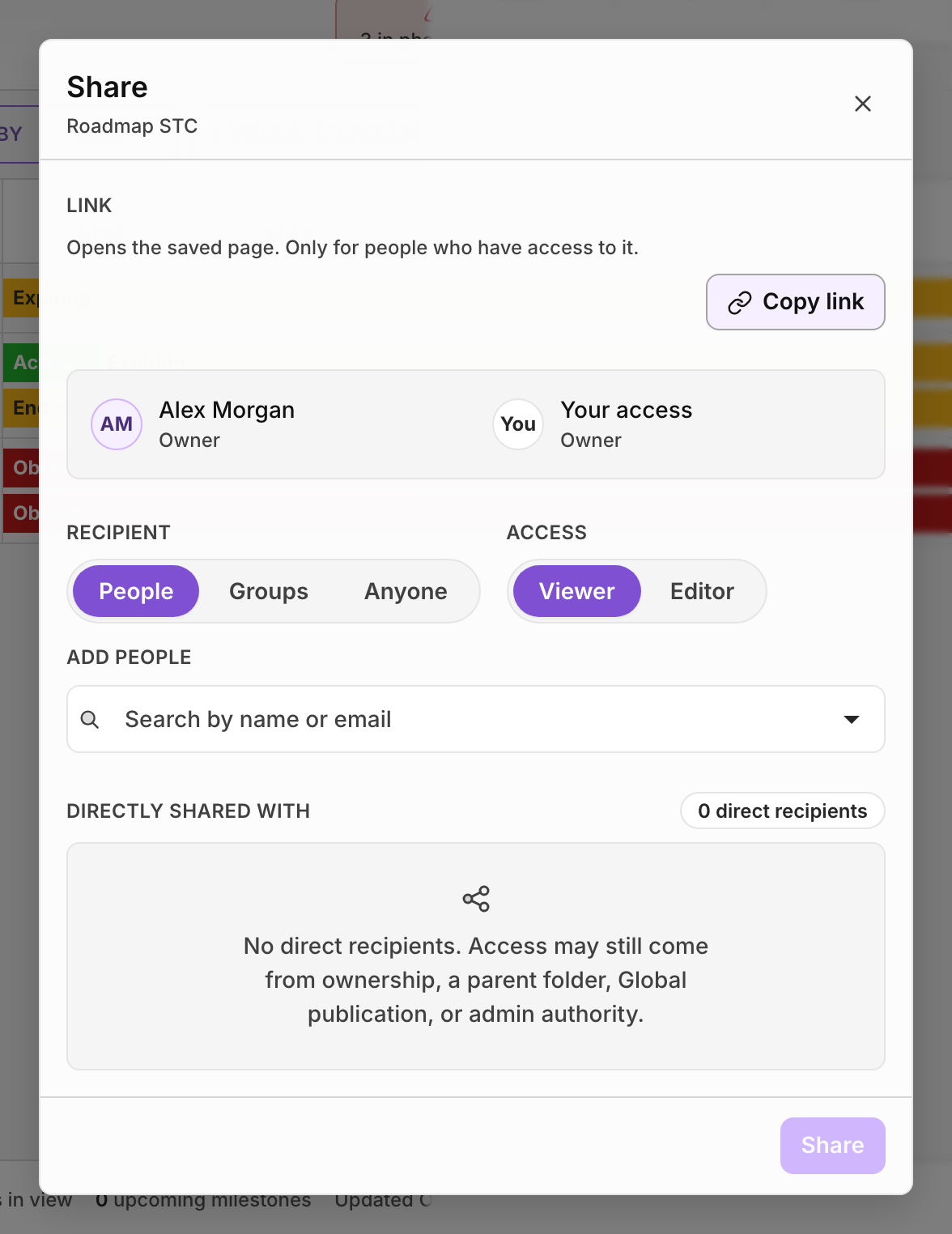
1. Click **Share** in the content header, or choose **Share** from the item's **⋯** menu.
2. Under **Recipient**, choose **People** or **Groups**. If you are allowed to publish, you also see **Anyone**.
3. Under **Access**, choose **Viewer** or **Editor**.
4. Search for the person or group and add them.
5. Click **Share** (or **Publish** for **Anyone**).
The recipient gets a notification. **Directly shared with** lists who has access, each with **Remove access**.
The Share dialog
| Access | What it allows |
| -------------------- | ------------------------------------------------------------------------------ |
| **Viewer** | Open the content and see it against live data. |
| **Editor** | Change it, and share it with others as viewer or editor. |
| **Anyone** (publish) | Everyone can open it, view only. Limited to users allowed to publish globally. |
### Copy a link
1. Click **Copy link** in the Share dialog, or **Copy page link** from the arrow next to **Share**.
2. For a Table, choose **This page** (your columns and layout, for people with access) or **These records** (the same records in the reader's own columns, with no sharing needed).
### Delete and restore
1. Choose **Delete** from the item's **⋯** menu, and confirm.
2. To get it back, open **Trash**, find the item and click **Restore**.
## Good to know
{% hint style="info" %}
**A link is an address, not a key.** Sending it grants nothing. The person opening it sees the content only if their roles and grants already allow it, so a link is safe to paste into a ticket or a chat.
{% endhint %}
* **Sharing a folder shares everything inside it.** Where someone holds more than one grant on an item, the strongest applies.
* **Sharing is checked on every read**, on the server, against the grants in force at that moment. Revoking access takes effect immediately.
* **An item must be in My Space before you can share it.** Command says "Save this page to My Space before sharing" otherwise.
* **Opening a link** restores that page. Your other tabs come from your own settings, so a shared link never puts you into someone else's workspace.
* **Content shared with you** shows **Remove from my view** instead of **Delete**. It leaves your space only; the owner and everyone else keep it.
* **Deleting content you own** removes it for everyone you shared it with, and closes its tab.
* **Trash** shows when **Delete permanently** becomes available for each item. Permanent deletion removes the whole subtree and cannot be undone.
* **Deleting content never deletes the ServiceNow records it shows.**
## Related
* [The Portal](/command/the-portal/portal.md)
* [Content types](/command/the-portal/content-types.md)
* [Access Rights](/command/prior-v26.0/configuration/access-rights.md)
---
# Agent Instructions
This documentation is published with GitBook. GitBook is the documentation platform designed so that both humans and AI agents can read, navigate, and reason over technical content effectively. Learn more at gitbook.com.
## Querying This Documentation
If you need additional information that is not directly available in this page, you can query the documentation by asking a question.
Perform an HTTP GET request on the following URL with the `ask` and `goal` query parameters:
```
GET https://docs.ins-pi.com/command/the-portal/my-space.md?ask=&goal=
```
`ask` is the immediate question: it should be specific, self-contained, and written in natural language.
`goal` is what the user is ultimately trying to achieve, the reason they need the answer. Sharing it helps GitBook give you a better, more relevant answer. A goal is most helpful when it describes the outcome the user wants rather than restating the question. For example, with `ask=how do I create an API token`, a goal like `automate deployments from our CI pipeline` lets GitBook tailor the answer to that use case.
The response will contain a direct answer to the question and relevant excerpts and sources from the documentation.
Use this mechanism when the answer is not explicitly present in the current page, you need clarification or additional context, or you want to retrieve related documentation sections.