> For the complete documentation index, see [llms.txt](https://docs.ins-pi.com/llms.txt). Markdown versions of documentation pages are available by appending `.md` to page URLs; this page is available as [Markdown](https://docs.ins-pi.com/models/bpm-process/bpmn-shapes.md).

# BPMN Shapes & Swimlanes

The **BPMN** shape library gives you everything for a Business Process Model and Notation diagram: events, activities, gateways, data objects, artifacts and swimlanes. This page covers the parts that behave differently from ordinary shapes: pools and lanes, and sub-processes that expand and collapse.

## Where to Find the Shapes

Open the **Diagramming** panel and expand **Shapes > BPMN**. The library is grouped into **Events**, **Activity**, **Artifacts**, **Swimlanes**, **Gateway** and **Data**.

<figure><img src="https://2110136944-files.gitbook.io/~/files/v0/b/gitbook-x-prod.appspot.com/o/spaces%2FOS5XKTz5WlrX4s5rESlH%2Fuploads%2Fgit-blob-c79259567592d2524e473a3481e0c8fe97e478c4%2Fv26.1-bpmn-palette-activity.png?alt=media" alt=""><figcaption><p>The Activity group with the sub-process shapes</p></figcaption></figure>

## Pools and Lanes

A **pool** represents a participant, a **lane** a role or system inside it. **Swimlanes** offers a horizontal and a vertical **Pool** and matching **Lane** shapes. A new pool arrives with one lane; drop more lanes into it, or select a lane and use the **insert lane above / below** buttons on its toolbar. The pool grows around its lanes, and each lane has a **−** button to collapse it.

<figure><img src="https://2110136944-files.gitbook.io/~/files/v0/b/gitbook-x-prod.appspot.com/o/spaces%2FOS5XKTz5WlrX4s5rESlH%2Fuploads%2Fgit-blob-d5e94c9301166444877e76d00fd2e1bbb39017e6%2Fv26.1-bpmn-pool-lanes.png?alt=media" alt=""><figcaption><p>A horizontal pool with three lanes; the selected lane shows the insert-lane buttons</p></figcaption></figure>

* Tasks and events dropped into a lane become members of that lane and move with it.
* Sequence flows between lanes stay attached when a lane is resized.
* A pool can be horizontal or vertical. The orientation is read from the lanes it holds.

The simplified swimlane layouts in 26.1 keep lanes aligned and equally sized without manual adjustment. See also [Kanban Board](/models/work-in-the-app/editor/visualizations/kanban-board.md), which uses the same lane mechanics for task boards.

## Sub-Processes

A sub-process is an activity that contains a process of its own. The library ships around 20 sub-process shapes:

| Group                                  | Shapes                                                                                            |
| -------------------------------------- | ------------------------------------------------------------------------------------------------- |
| **Plain**                              | Sub Process, Ad-hoc Sub Process, Event Sub Process                                                |
| **Interrupting event sub-process**     | Message, Timer, Conditional, Signal, Multiple, Parallel Multiple, Escalation, Error, Compensation |
| **Non-interrupting event sub-process** | Message, Timer, Conditional, Signal, Multiple, Parallel Multiple, Escalation                      |

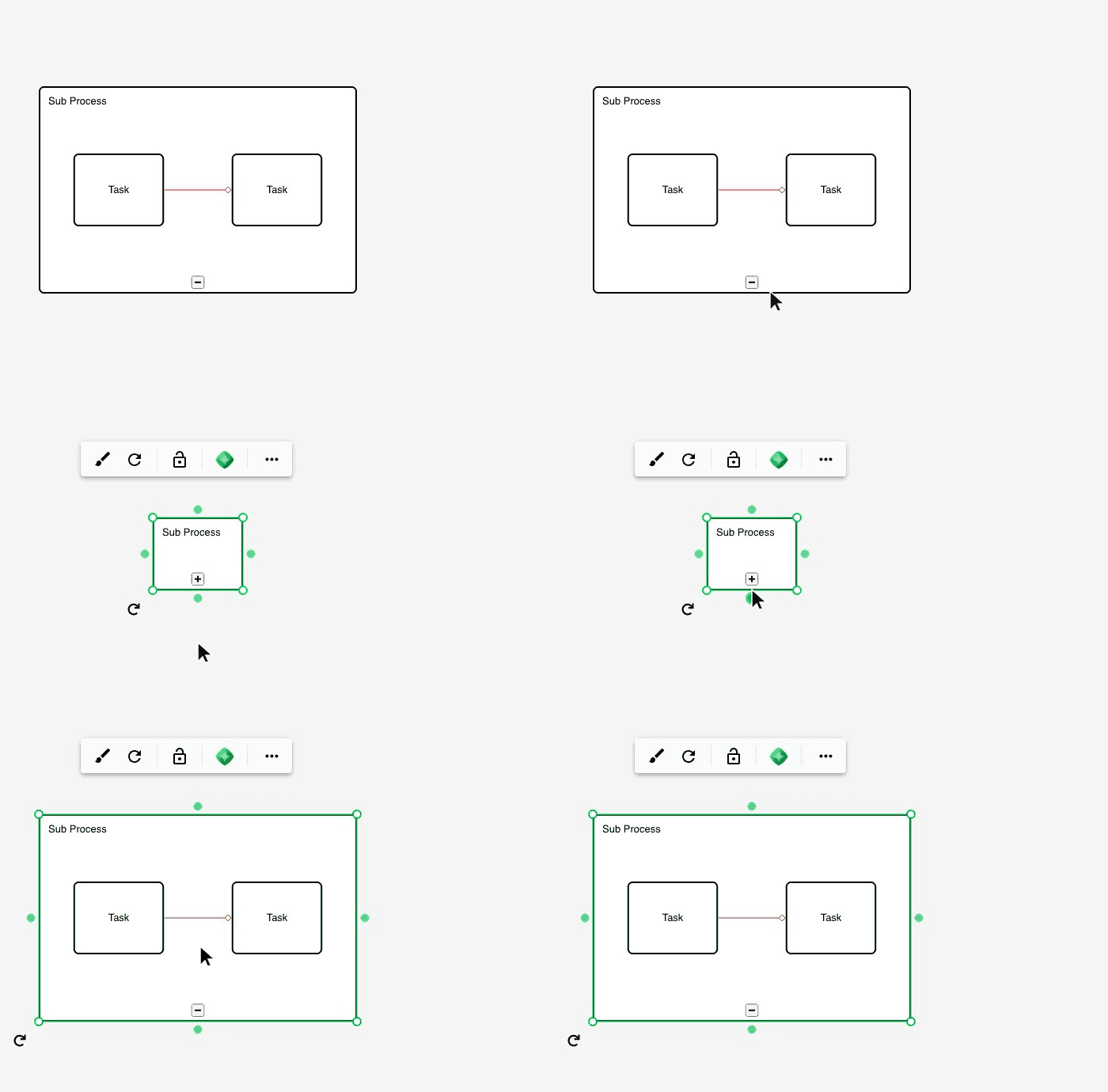
<figure><img src="https://2110136944-files.gitbook.io/~/files/v0/b/gitbook-x-prod.appspot.com/o/spaces%2FOS5XKTz5WlrX4s5rESlH%2Fuploads%2Fgit-blob-4299049641591b439c302aea174aedb6dd48d18b%2Fv26.1-bpmn-subprocess.gif?alt=media" alt=""><figcaption><p>Collapse a sub-process to a single task, expand it to see the process inside</p></figcaption></figure>

### Expanding and Collapsing

Every sub-process shape has a **−** / **+** button on its bottom edge.

* **Collapsed** — the shape is the size of a task and shows only its name. The content inside is kept.
* **Expanded** — the shape grows to show the tasks, events and flows inside it.

Relationships to and from elements inside the sub-process stay visible in the expanded state and reconnect to the sub-process border when it is collapsed.

### Building the Inner Process

Drop tasks, events and gateways into an expanded sub-process and connect them as usual. Paste works too: copy a set of elements and paste them while the sub-process is selected.

## Importing BPMN Files

Process diagrams exported from other tools as **BPMN 2.0 XML** can be imported through the [Migrator](/models/admin/migrator.md). Sub-processes, pools and lanes are recognised, and a file with several diagrams becomes several frames on one board.

<figure><img src="https://2110136944-files.gitbook.io/~/files/v0/b/gitbook-x-prod.appspot.com/o/spaces%2FOS5XKTz5WlrX4s5rESlH%2Fuploads%2Fgit-blob-533ab9438cd05923f3d845757369bab3e0a82966%2Fv26.1-migrator-bpmn-result.png?alt=media" alt=""><figcaption><p>A BPMN 2.0 file after import: pool, three lanes, a gateway and an expanded sub-process</p></figcaption></figure>

## Letting the AI Draw It

Describe the process and its actors and the [AI Assistant](/models/work-in-the-app/ai/architecture-diagrams.md) builds the pool, lanes, tasks and gateways for you.

## Related

* [Shape Libraries](/models/work-in-the-app/editor/shape-libraries.md) — all bundled libraries
* [Grouping](/models/work-in-the-app/editor/grouping.md) — how containers and members behave
* [Relationships](/models/work-in-the-app/editor/relationships.md) — sequence flows and message flows


---

# Agent Instructions
This documentation is published with GitBook. GitBook is the documentation platform designed so that both humans and AI agents can read, navigate, and reason over technical content effectively. Learn more at gitbook.com.

## Querying This Documentation
If you need additional information that is not directly available in this page, you can query the documentation by asking a question.

Perform an HTTP GET request on the following URL with the `ask` and `goal` query parameters:

```
GET https://docs.ins-pi.com/models/bpm-process/bpmn-shapes.md?ask=<question>&goal=<user_goal>
```

`ask` is the immediate question: it should be specific, self-contained, and written in natural language.
`goal` is what the user is ultimately trying to achieve, the reason they need the answer. Sharing it helps GitBook give you a better, more relevant answer. A goal is most helpful when it describes the outcome the user wants rather than restating the question. For example, with `ask=how do I create an API token`, a goal like `automate deployments from our CI pipeline` lets GitBook tailor the answer to that use case.

The response will contain a direct answer to the question and relevant excerpts and sources from the documentation.

Use this mechanism when the answer is not explicitly present in the current page, you need clarification or additional context, or you want to retrieve related documentation sections.